
Instrucciones

Instrucciones para ver el contenido en español

El objetivo del Departamento de Ingresos de Colorado (CDOR, por sus siglas en inglés) es garantizar que la información disponible en nuestros sitios web sea útil y accesible para todos. Esta página proporciona instrucciones para ver contenido en español en los sitios web del CDOR. 
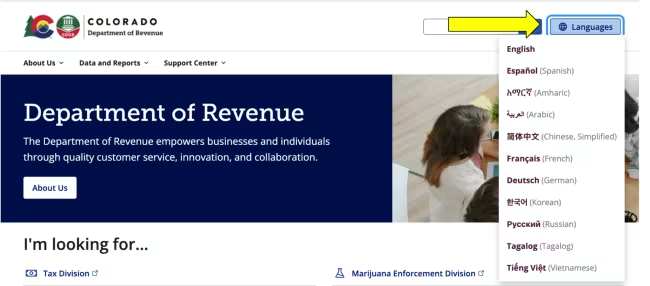
This image shows a screenshot of the Colorado Department of Revenue homepage. A prominent yellow arrow points to the "Languages" button located in the top right corner of the screen. The language menu is expanded, revealing a drop-down list of available translation options such as Español, Arabic, and Korean.

Paso 1:

En cualquier página del Departamento de Ingresos de Colorado, vaya a la esquina superior derecha y haga clic en "Languages”.
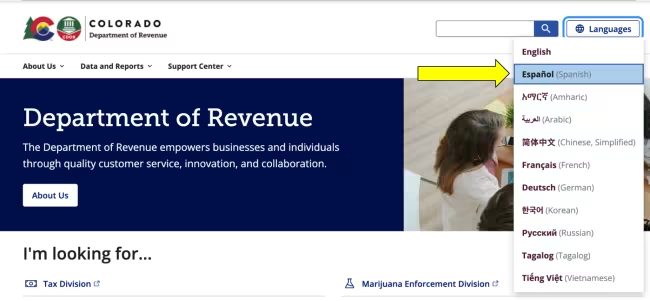
This image displays a screenshot of the Colorado Department of Revenue website with the "Languages" drop-down menu open. A bright yellow arrow points directly to the "Español" Spanish option in the list. This specific language choice is highlighted in light blue, indicating that it is the option to be selected.

Paso 2:

Seleccione "Español" en el menú desplegable.

MyDMV en español

 Cómo ver el contenido en español de MyDMV usando estos navegadores web:

Colorado Department of Revenue Division of Motor Vehicles Logo

MyDMV Instrucciones
